Step 2: Lab
Choose the lab components. Pick the Vault and set how many of each component to install. There are no ready-made labs to choose from: the card Vault and components is the only selector.
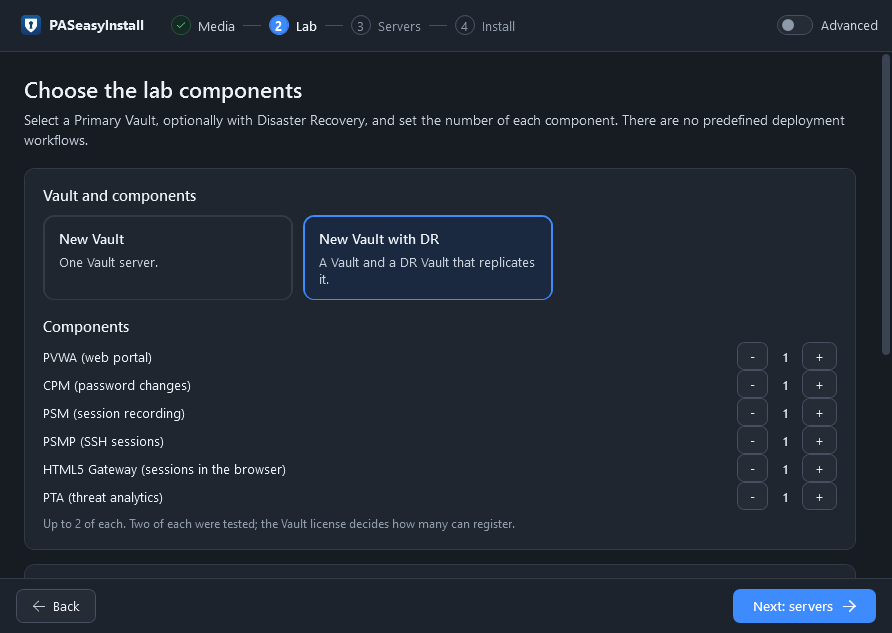
The Vault
- New Vault: one Vault server.
- New Vault with DR: a Vault and a DR Vault that replicates it.
- Use existing Vault (advanced), only with Advanced on: no Vault is installed, the components are added to a Vault you already have. Choose at least one component then.
Both new Vault choices need fresh servers. More: Vault, DR Vault.
The components
One line per component, with − and +:
| Line | Component |
|---|---|
| PVWA (web portal) | PVWA |
| CPM (password changes) | CPM |
| PSM (session recording) | PSM |
| PSMP (SSH sessions) | PSM for SSH |
| HTML5 Gateway (sessions in the browser) | HTML5 Gateway |
| PTA (threat analytics) | PTA |
A new lab starts with one PVWA, one CPM and one PSM. Zero leaves a component out. Up to two of each, with Advanced up to four; two of each were tested, and the Vault license decides how many can register. PTA is the exception: one per lab (see PTA). A line whose installer was not found on the Media step says no installer in the media folder: set it to zero, or go back and add the installer.
Next does not go on while something does not fit. The window says what, for example:
- PTA connects to PVWA: add a PVWA. PTA also needs a PSMP package in the media (it holds the CyberArk package signing key), even without a PSMP in the lab.
- The HTML5 Gateway opens PSM sessions and is entered into PVWA: add a PVWA, and with a new Vault also a PSM. It also needs the PACLI package in the media.
- A component that has no installer in the media.
Server for CPM
In a lab with PVWA and CPM, Install CPM on the PVWA server (one server less) is switched on. Switch it off to give CPM a server of its own; the Servers step then has one more line.
Server for the HTML5 Gateway
In a lab with PSMP and an HTML5 Gateway, Install the HTML5 Gateway on the PSM for SSH server (one server less) is switched on. Switch it off to give the gateway a Linux server of its own; the Servers step then has one more line. Without a PSMP in the lab the gateway always has a server of its own.
Active Directory (Advanced only)
- No domain: the servers stay as they are.
- New domain: one more server becomes the domain controller of a new forest. The PVWA, CPM and PSM servers join it before they are installed (they restart once), and at the end the CyberArk hardening GPOs from the vendor packages are imported and applied to them.
- A domain I already have: the PVWA, CPM and PSM servers join it. Its GPOs are not touched. On the Servers step you enter the address of one of its DNS servers and a domain account that may join computers.
With a domain, enter its DNS name of the domain, for example pam.lab. Vault servers are never joined to
a domain. More: Active Directory.
Name of the lab
Installations are listed under this name. Letters, digits, dot, dash and underscore.
Next: Step 3: Servers.